My Cluster Told Me the Backup Drive Was Dead. I Didn’t Listen at First.
In my last post I wrote about the “32TB” backup drive that turned out to be a single SD card behind a lying controller chip. This one covers how I found out it had died. My cluster told me. It just took me a few tries to hear it.
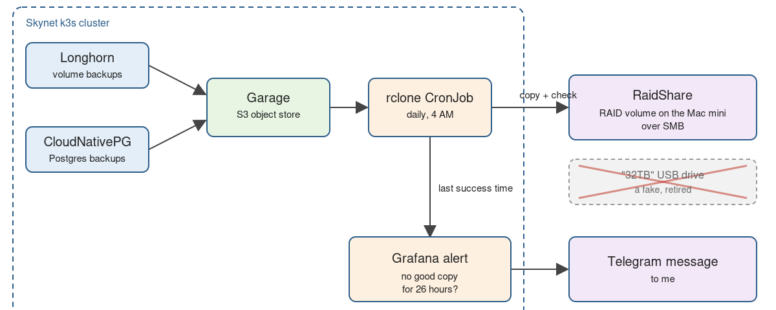
Quick recap. Garage holds my Longhorn and CloudNativePG backups, and every night at 4 AM a CronJob called garage-rclone-copy copies all of it off the cluster and checks the copy. That copy was going to the fake drive.
Next to that job sits a Grafana alert called “Garage off-site copy stale”. It uses kube-state-metrics, which already reports when each CronJob last succeeded. The alert asks one question: has the copy gone more than 26 hours without a success? Twenty-six hours is one daily run plus some slack, so a single slow night doesn’t page me, but a missed run does. When it fires, Grafana sends it straight to me on Telegram.
When the drive bricked, the nightly copy started failing, and Telegram started filling up. The first one came in on October 21st, and then it resolved on its own, which made it easy to shrug off as a blip. Looking back, the drive was probably already failing and managed one more good copy. Then it fired again, and again. Honestly, I either missed those notices or didn’t fully understand what they were telling me. A wall of labels like cronjob, namespace and kube-state-metrics doesn’t exactly say “your backup drive is dead”. It took a few more before it clicked. One of those later messages read “rclone copy of Garage to smb-32tb has not succeeded for 26h”, with a value of 301,214 seconds, about three and a half days since the last good copy.
After I moved the copy to RaidShare on my Mac mini and the first run passed, the same alert came back as resolved. The value had dropped to 33 seconds, and the summary now said “RaidShare” instead of “smb-32tb”.
The point is simple. A backup job that fails quietly looks exactly like one that works. Watching for the last success, not for errors, is what caught this one, because a dead drive doesn’t always throw a clean error. It just stops letting the job finish.
The second lesson: an alert that fires and then clears is not an all-clear. It’s often the first sign something is dying.
The third lesson is about the message itself. An alert only helps if you understand it when it lands. Mine would be better with a plain-English first line: which backup, where it was going, and how long since the last good copy, in hours instead of a raw count of seconds.
If you run backups as CronJobs, kube_cronjob_status_last_successful_time is already in kube-state-metrics. One alert rule on it is cheap insurance, as long as you can read what it’s telling you.